After the User Experience

Designing for BRCK

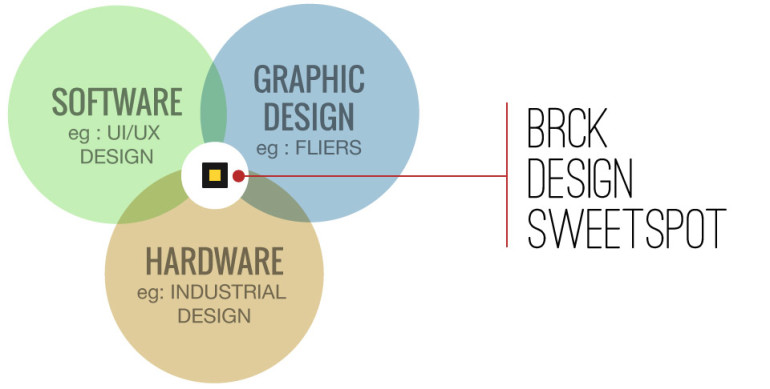
Designing for the BRCK involves more than most tech design processes coming from the African startup space, since we have to deal with hardware as well as software.

Many designers get the opportunity to work on software (UI) and print at some point in their lives but very few get to touch hardware. BRCK is a merger of both and that’s what makes it the ideal testing ground for a designer willing to go the extra mile.

ux


Having been a designer for over 12 years, I have worked on graphic design projects, print work and web design (UI), but never got the opportunity to be part of a team that builds hardware.

The challenges  one faces are tougher because one has to think of the product from a holistic view and not just one angle eg : A UI designer’s focus is only on a users screen and not print.

The BRCK is made up of :

  • Hardware (The physical BRCK),
  • Software (Firmware / OS that sit on the hardware and the cloud used to manage the BRCK remotely via the internet)
  • Print  (Packaging box and User guide material.)

All this has to merge seamlessly so as to ensure the end user gets a product that’s easy to use right out of the box.
design

User Learning Curve

All products have a learning curve when it comes to user interaction. Some products tend to have a steeper curve than others if :

  • The product is new in the market or
  • If the product is a reinvention of what already exists.

Some physical products that already exist and have a predefined way of user interaction, it’s much simpler building a new product on that mindset.

The BRCK falls into the reinvented bracket. WiFi routers were there before, but what our team behind BRCK is out to do is build a product that solves the problem of Internet connection in emerging markets using a solution that’s tailored for those environments.  This means unreliable power, power surges, and a failover from “normal” ethernet internet into wireless 3G.

By so doing we had to look at the typical pain points people face while trying to get online then design and build a product tailored to those needs. We had to do away with the typical stereotypes of what a router looked like and how they worked thus creating a product that would be:

  • Mobile – For when you’re mobile
  • Versatile – Made to work where others won’t
  • Powered (Rechargeable battery) – Thinking through power as much as connectivity
  • Extendable – A platform to build on with software or hardware
  • Cloud Managed – Manage your BRCK from anywhere

The BRCK was a product that was designed and functioned totally differently from other WiFi routers so we had to communicate well in order to minimize the learning curve and frustration of having to set one up.

The Unboxing process

Let’s jump 12 months from when we started this process, almost all the work is done and the first batch of the BRCKs have be shipped. Our team has put a lot of attention in designing and building a product we believe will deliver great experience.  However, like all other products there are things you will learn once someone else (a customer) interacts with your product for the first time.

Having interacted with the product for months over, we had our design thoughts set out based on our understanding on how users would interact with what we had built. That said we weren’t too naive to think we wouldn’t  have to make some minor changes based on the feedback we got after running a few internal UX (User Experience) sessions.

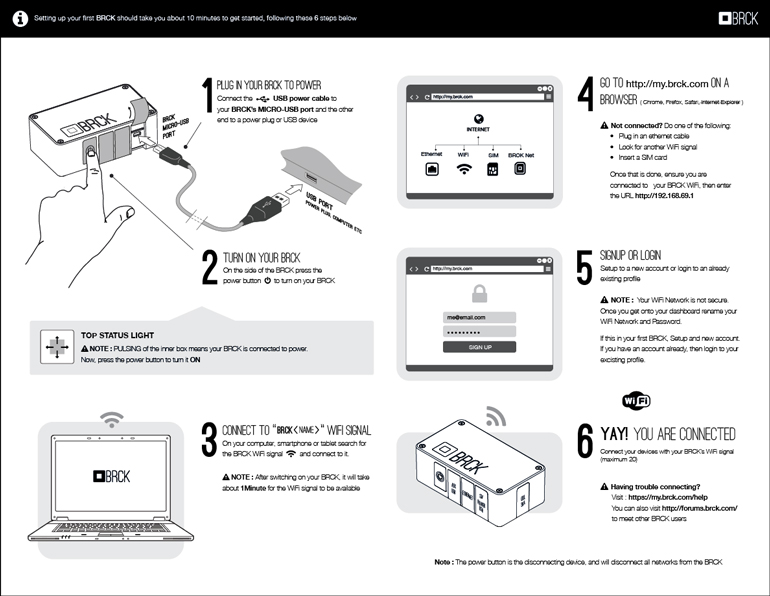
What we got to learn was that we shouldn’t assume some steps are obvious. Some of our design thoughts did contrast with what we saw. BRCK is a merger of hardware and software, with the process of how to setup being explained on a single A4 sheet of paper (The Quick Start Guide – the document in the packaging that explains the steps you take to setup your BRCK for the first time ).  The BRCK did work great but our communication on how to get the BRCK working on the “quick start guide” had to be thought through again.

This forced us to go back to the drawing board and solve some communication pain points that hindered users in getting their BRCKs up and running in minimal time.  Our focus now was to give more detail on the quick start guide at the same time to try make sure we do not clutter the page with extra information.

What we Learnt and changed

After opening the packaging most people grabbed the BRCK, picked the quick start guide and quickly browsed through it without reading the content. It was only after they couldn’t figure out what to do that they jumped on to the quick start guide.

Some of the core lessons we got to learn from the users were:

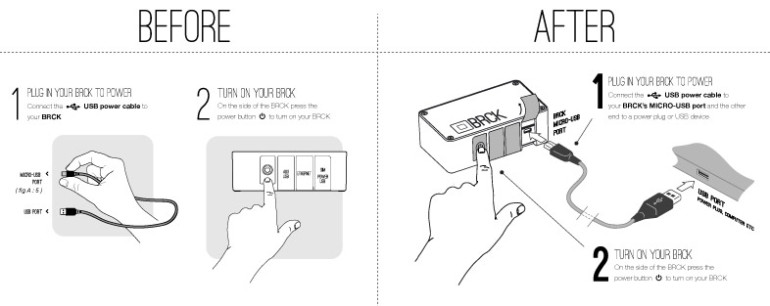
  • They weren’t sure which side of the MICRO-USB CABLE went where.
  • When the BRCK was charging most thought it was ON.
  • How long does it take to view a WiFi connection.

After getting this feedback our goal became to try minimize the setup process time. From when a user unboxed their BRCK to when they were fulling registered at an average of 20 minutes to 10 minutes.

What did we have to do so as to achieve this? We had to reduce the steps and better explain each in better detail. This doesn’t mean we had to add text.  They say an image is worth a thousand works. We set out to use imagery to better explain the steps one would take to setup their BRCK.

We replaced certain graphics and added some in order to achieve this. Below are examples of some of the changes we made.

Old and New visual of the first setup steps
usb


The Status light was confusing to users when they first plugged in their BRCK.
So we added a graphic to explain this better

light


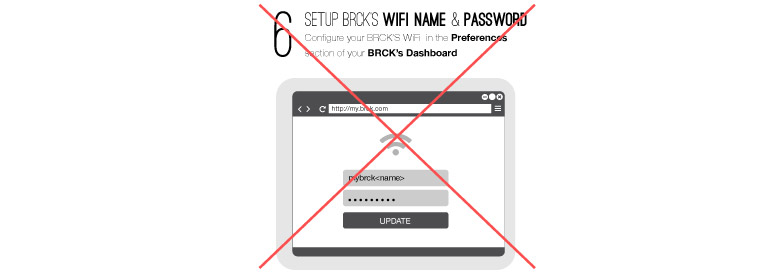
We then set out to remove the setting of the WiFi from the registration process so as to reduce the steps.
remove_wifi

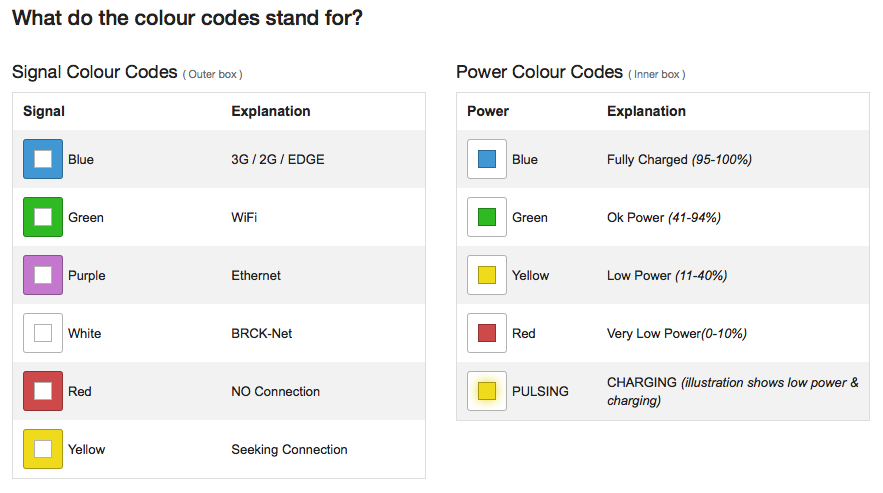
Finally our greatest challenge was how do we communicate what the status light colour codes meant. The top light of the BRCK is the main physical communication point between the hardware and the user. This is done using different colors spinning and pulsing. The Quick start guide was printed in grey scale and we needed a way of conveying this information to our user without using text.  We then came up with the colour code charts.

This are business sized cards that visually illustrate what each colour is and does.
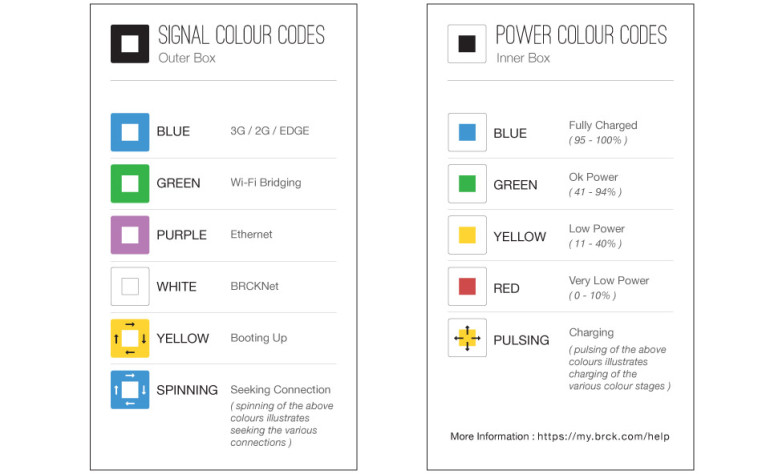
cards


Below are the full versions of both.

BEFORE
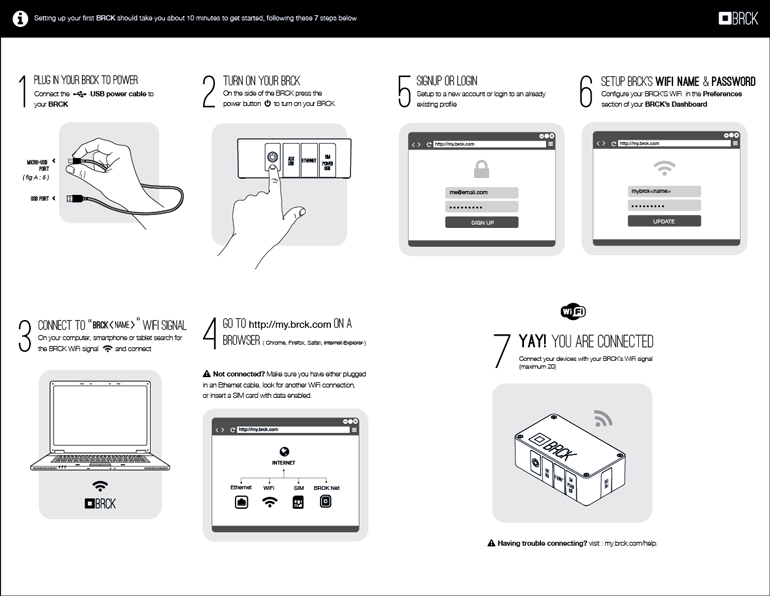
old

View More : Download


AFTER

new

View More : Download
BRCK How To: Registration

Welcome to a new series of videos called BRCK: How To’s!

We’re kicking things off with a step-by-step walkthrough of the first thing you’ll want to do when you get your BRCK: register it. Learn everything from what the lights mean to how to handle some commonly encountered issues. Enjoy, and see below for a description of the registration process!

BRCK How To: Registration from BRCK on Vimeo.

Registration process:

To setup your BRCK for the first time, plug it in and turn it on. The lights will tell you what it is doing.

The center light tells you your power status:

  • Red < 10%.
  • Yellow < 40%.
  • Green < 95%.
  • Blue < 100%.
  • Pulsing indicates that your BRCK is charging.

The outer lights indicate your connection status:

  • Spinning means the BRCK is searching for a connection.
  • Solid outer lights mean your BRCK has established a connection. The outer ring will pulse at a rate that indicates your connection speed.
  • Orange is for the BRCK’s internal startup process.
  • Purple is for Ethernet connections.
  • Green is for WiFi bridging.
  • Blue is for 3G.

Visit my.brck.com/help for a helpful guide to the color scheme.

To register your BRCK, it needs to be connected to the Internet. After you turn it on, do one of the following:

  • Plug in an Ethernet cable from another modem or router.
  • Insert a data enabled SIM card.
  • Or use the local dashboard to configure a WiFi bridge (more on this below).

Go to your WiFi list and look for your BRCK. It will appear as “BRCK_somelongstringofnumbers”.

Connect to it, open your browser and go to my.brck.com.

If you have an Ethernet or SIM connection, you will be taken to the registration page and can skip the next step.

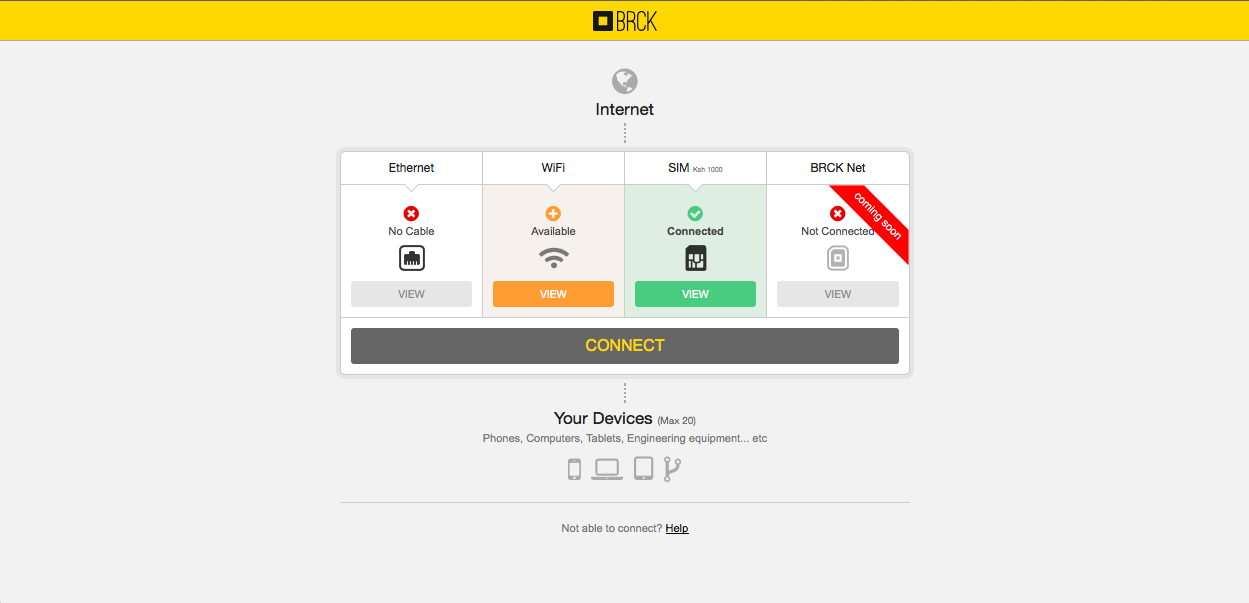
If you do NOT have an Ethernet or SIM connection, you will be redirected to the local dashboard where you can configure a WiFi bridge:

  • Click “View” under WiFi.
  • Select your network.
  • Enter your password.
  • Click join.
  • Wait patiently while your BRCK configures these changes (this can take several minutes).

Once you are directed to the registration page, click “Sign up”.

  • Enter your name, email, and choose a password.
  • Click “Create account”.
  • Once your BRCK has finished applying these changes, click “Go to your dashboard”.

You will be taken to the cloud dashboard for your BRCK, where you can see statistics regarding your power status, data usage, and devices connected to your BRCK.

Click on “Preferences” in the left pane to change your connection configuration.

  • To change the name of the WiFi network your BRCK broadcasts, click in the box under “WiFi Name”.
  • Enter a new name, set a password, and click “Save”.
  • You may see an error message at this point. This happens because once you’ve changed the name of your BRCK’s WiFi network, your computer will lose connection to it and the cloud dashboard.

To reconnect to your BRCK’s new WiFi network:

  • Open your WiFi list.
  • Your BRCK’s new WiFi name should appear shortly.
  • Connect to it, et voila!

Congratulations, your BRCK is now registered! You can access the Internet, the cloud dashboard, and configure your BRCK from anywhere in the world.

Of Trees and Forests – Improving the BRCK User Experience

You’ve heard the expression about missing the forest for the trees.  It happens to the best of us.  It even happens to tiny little hardware startups in Kenya.  We have been so focused on the details of getting our product to market that we weren’t able to put the BRCK – new in the box – into the hands of real users and get their feedback on registering and configuring the BRCK.  In all fairness, we only received our first shipment of production BRICKs in Nairobi on Friday – we have been doing all of our development and testing with about 12 overworked, under-appreciated, pre-production units.  I’m not trying to make an excuse for us missing one of our core competencies.  Just praying for a little understanding as we work through the user experience (UX) of interacting with a BRCK.

The initial user reports started trickling in over the last week and half as we have been ramping up our shipping volumes.  Initially the feedback was very positive with comments on the packaging, the quality of the BRCK, even the colors of the charging cable.  However, there were also those occasional but niggling little comments on some frustrations with getting the BRCK setup.  We did get some pretty brutal feedback from our internal family at Ushahidi – who received the initial BRCKs from the production line – but we did somewhat discount their experiences based upon small fixes and patches that we had subsequently pushed into the production process.

We then started receiving some more concerning reports from real customers as our support systems started getting put into service.  Questions about what the lights meant, whether the BRCK was powered on, how to properly insert SIMs/chargers, etc.  Some of the questions were understandable.  Others, however, seemed peculiar given how easy the BRCK is to setup – or so we thought.  You see, most of us have set the BRCK up hundreds of times – personally I’m inching towards 1,000 setups.  We start it up, watch the sequence of lights, allow the BRCK to navigate us to the registration page, enter our information, and wait patiently for the new settings to be applied and the Internet to begin streaming through our browsers.  We test with Ethernet cables, SIM cards, and even WiFi-bridging to our office routers.  Sure we run into issues, but these issues get logged in our bug tracking system, assigned to a resource, fixed, deployed, and retested.  We are professionals; we know how to make robust technology – or so we thought.

We quickly noticed that some of the early adopters had bad experiences setting up their BRCKs, and with a foreboding ounce of humility that we decided we needed to throw a few more factory-fresh BRCKs in front of some of the great tech folks that hang around in Nairobi and record their experiences and observations with unboxing and setting up a BRCK.  We started by heading down one floor to the amazing ladies who run Akirachix.

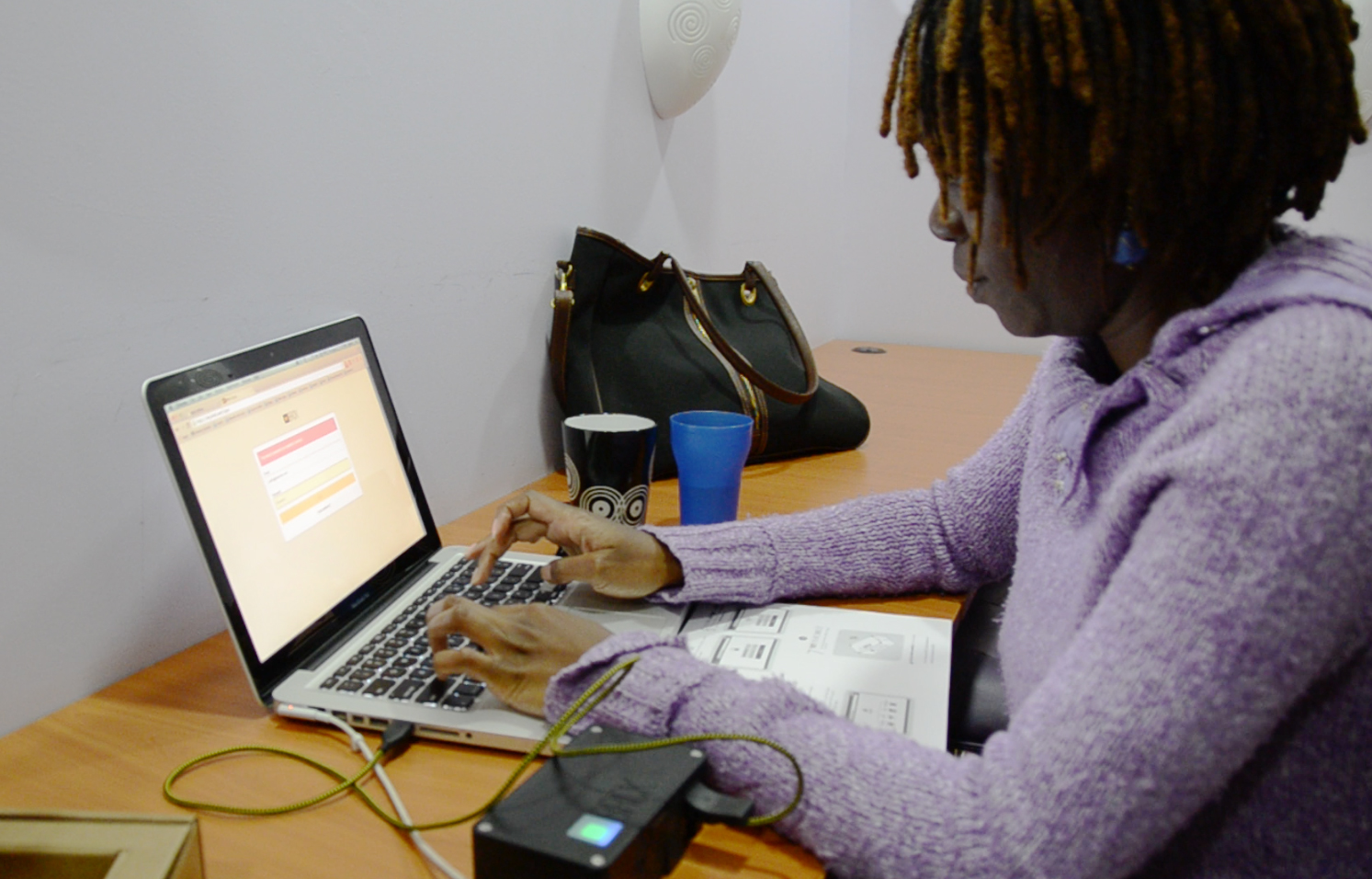
Judy from Akirachix setting up a BRCK

Judy from Akirachix setting up a BRCK

They’re super smart, super tech-savvy, and passionate about technology from Kenya – especially BRCK.  It was just a little embarrassing when they struggled with even getting the BRCK powered on.  We then brought in one of our key local business partners, Upande, who have been chomping at the bit to get their hands on BRCKs to begin integrating a bunch of sensors and gadgets.  We sat their principal down in our conference room with a running video camera, brought in the entire BRCK team to watch him, and then furiously started scribbling on notepads.  It wasn’t pretty.

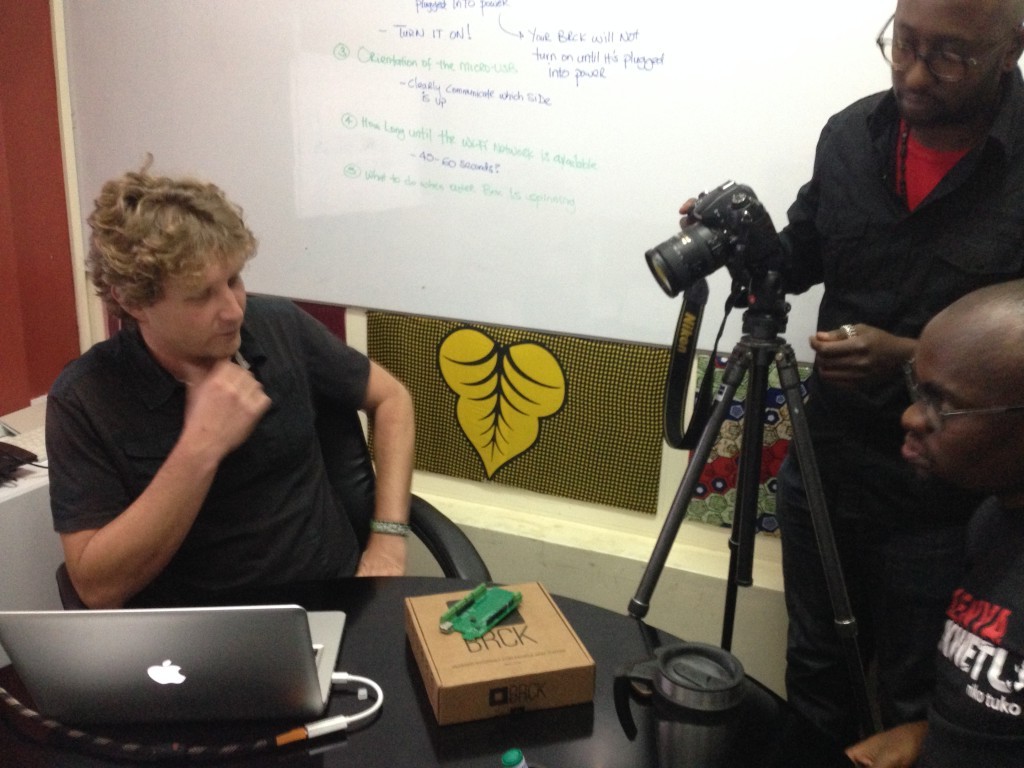
Mark from Upande setting up his BRCK

Mark from Upande setting up his BRCK

Things that are completely obvious to us were completely unobvious to the user.  The user guide – while well designed – failed to communicate a handful of really key pieces of information that provide context to a user setting up their BRCK.  The amazing lights – which get lots of oohs and aahs – mean absolutely nothing without a clear explanation.  We quickly huddled the team, watched the tapes, reviewed the play-by-play notes, and grumbled as we saw the small but significant omissions in our user experience.  Nothing fatal.  Honestly, nothing that significant.  But, for us and our users, a perceptible distraction from the quality of the hard work that we have put into BRCK over the last 18 months.

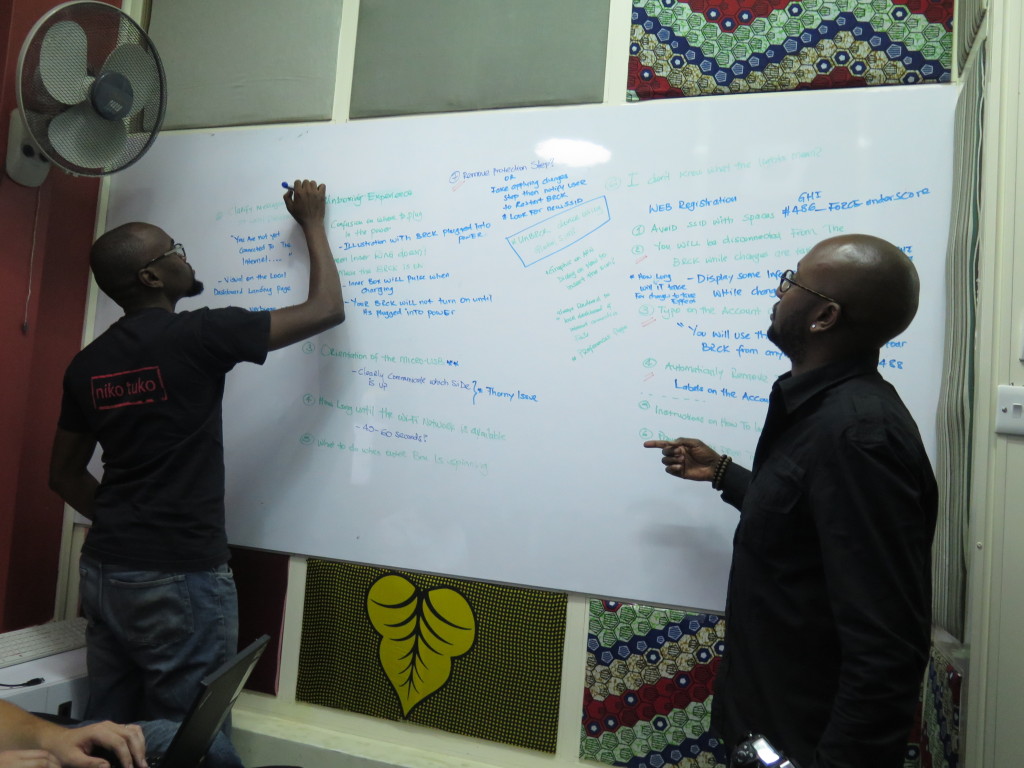
Emmanuel and Jeff eworking the setup process

Emmanuel and Jeff reworking the setup process

Undeterred in our mission – or our pursuit of excellence – we devised some immediate changes to the registration process that should dramatically simplify the setup experience.  We also designed and had printed a color chart to explain the lights on the BRCK – we are including these in the box going forward and posting them in the mail to everyone who already has BRCKs.

Because the UX is so important we have placed the production and shipping on a brief pause while we sort through these handful of changes.  I know we won’t get everything resolved to your, or our, demanding standards but hopefully we can move the needle in the right direction.

Although these changes will have the biggest impact on customers who haven’t yet received their BRCKs, we did want to outline a few of the critical aspects of setting up a BRCK that have proven to be hurdles in the process for clients who already have their BRCKs:

1)   The Spinning Lights – in short, the outer LEDs are the connectivity indicator and the inner LED is the battery indicator.  The battery light will be on (and flashing) while charging but this does not mean the BRCK is powered on.  Here is a link to our forum post on the meaning of the various colors (http://forums.brck.com/t/a-guide-to-the-light/108/2).

1b9d8f1603301e08

2)   USB Charging Connection – the charging connection for the BRCK is under the same flap as the SIM slot – the farthest slot on the right.  What is tricky is that the cable must be oriented with the USB logo facing down.  This is opposite of many devices and can cause some confusion. The other end of the cable can be plugged into any USB charging source (e.g. laptop, wall charger, another BRCK).

3)   Local vs Cloud Dashboard – there are actually two dashboards that are part of the BRCK.  For most activities, the Cloud Dashboard is the go-to location but it does require connectivity to the Internet to access. You can access the Cloud Dashboard at http://my.brck.com.  The Local Dashboard is provided solely to assist with getting a connection.  You can access the Local Dashboard at http://local.brck.com (also at http://192.168.69.1).  When navigating to the Local Dashboard you may see a spinning BRCK logo that indicates the BRCK is transitioning to a mode where the Local Dashboard can be accessed.  Please be patient, it can sometimes take awhile for the BRCK to make this transition.

BRCK Cloud Dashboard

BRCK Cloud Dashboard

BRCK Local Dashboard

BRCK Local Dashboard

4) Source of Internet – in order for the BRCK to get registered you will need a working source of Internet.  The easiest way to achieve this is to connect an ethernet cable from your home router.  Another easy way is to insert a pin-unlocked 3G SIM with a data bundle.  If neither of these options are available, the BRCK will reroute you to the Local Dashboard where you can connect via WiFi-bridging or configure a locked SIM.

We’re continuing on user testing today and we have instituted some immediate changes to the registration and setup process that make the process clearer and more intuitive.  For those who have already received BRCKs, free free to get in touch with us at [email protected] and we’re happy to help you with any setup issues along the way.  We are also going to put out an unboxing and setup video this week.  We hope that seeing someone setup a BRCK will be a useful guide for getting your own BRCK registered and configured.

Finally, we know that many of you are eagerly awaiting receipt of your BRCKs.  We are finally make strides at getting our daily production volumes up and we expect to have the backlog cleared within the next 2 – 3 weeks.  We do apologize that this UX issue is going to delay shipping for a couple of days but we believe that it will be worth it if you are able to more fully enjoy your BRCK unboxing and setup experience.


An Nguruman Excursion

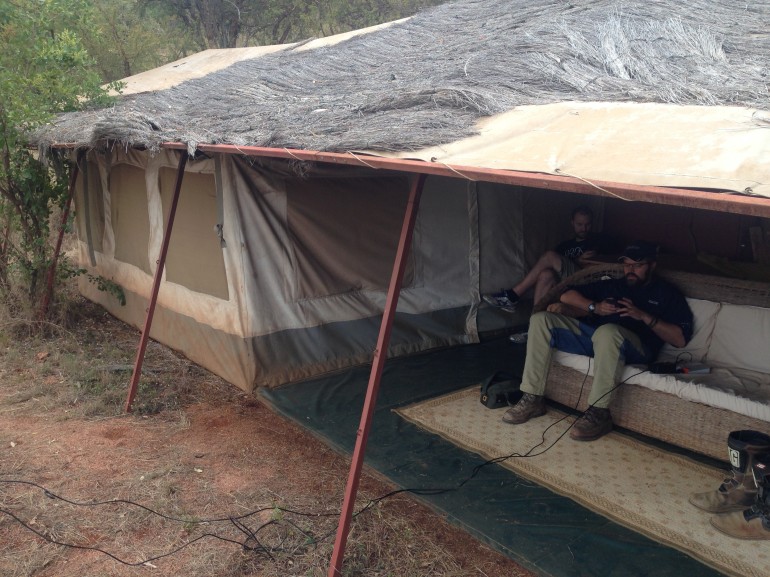
This weekend Reg, Philip and I took off for the Nguruman Escarpment, which is about a four hour drive outside of Nairobi. Our goal was to field test a BRCK with some friends of ours, Philip and Katy Leakey, who live in a tented camp at the top of the Ngurman escarpment, which is on the edge of the network.

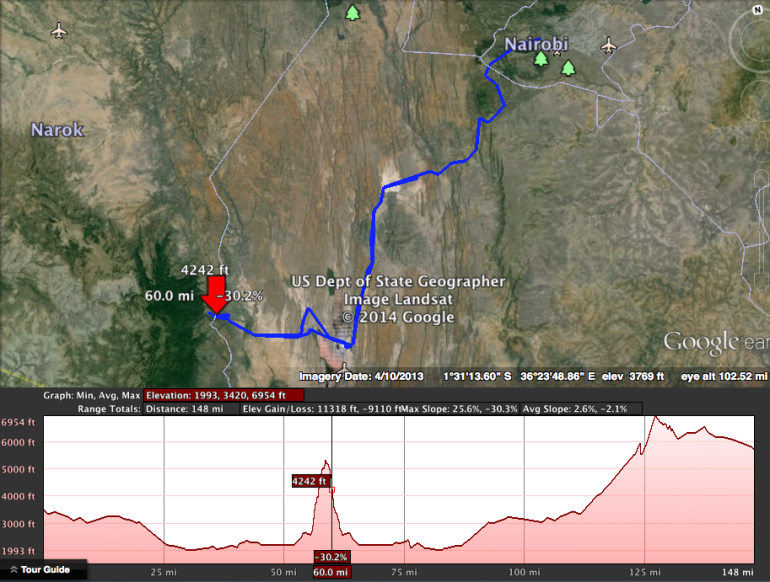
Nairobi to Nguruman route, with elevation.  Some areas at 31% grades.

Nairobi to Nguruman route, with elevation. Some areas at 31% grades.

The town of Ngurumani sits at the base of the escarpment, and you rise 3,000 feet on a rough dirt road in order to get to their camp. The Leakeys use solar and generator power, and the only way they can get internet is using either spotty 3g dongles, or very expensive (and slow) VSAT services. It’s not ideal, and for a couple who run some amazing businesses with global reach, that grow wealth in their Masai community, it’s a real problem to not be connected to the internet consistently.

The Journey

Early Sunday morning, we set out. I had done this drive in a car before, but wanted to see if I could do it on the motorcycle too, so both Philip and I rode out on bikes while Reg followed in the Land Rover. It’s an incredibly scenic trip, as you go through the dry, Masai country, over the sodium flats of Lake Magadi with their pink and white ponds, and into the back country. The views from the escarpment are majestic, and the air is clean and crisp, unlike Nairobi.

Coming down a steep and rocky hill overlooking Lake Magadi

Coming down a steep and rocky hill overlooking Lake Magadi

Reg in the Land Rover at Lake Magadi

Reg in the Land Rover at Lake Magadi

Philip crossing a stream

Philip crossing a stream

The good news was that we did the ride with no meaningful problems.

The bad news was that I was unprepared for just how difficult the climb up to the top of the escarpment is. In a car it’s tough, but 4 wheels give you some balance, as well as much needed traction when you get to the really steep grades that have a lot of sand beneath you. As if courting disaster, I also had forgotten to change my tires on my motorcycle to knobbies until too late, so was stuck going up in city tires. Not a good idea. There’s a part of the road that gets to 31 percent grade, with S-curves and if you slow down, you’re in trouble.

I ended up stalling out on this one particularly steep portion, and was exhausted trying to keep it upright, and push the bike forward as it dug itself deeper into the sand and gravel. Finally, Reg caught up with me and was able to help push as I got it going again, and we were able to get to the top without any more issues. The way back down was just a controlled slide, as the brakes helped, but you couldn’t actually stop yourself from progressing downwards. One particular S-curve remains engraved in my memory, since that’s where a cobra dropped from a bush next to me. Fortunately it was small, and wanted to get away from me as much as I did from it, so we parted amicably.

The Field Test

We carried with us an assortment of large and small antennas, and we were particularly keen to try out the new ones from Poynting Antenna in South Africa. We also brought the normal BRCK, Sandstorm case and our Wilson antenna amp (booster). Beyond that, we carried our standard medical kit, tools, SIM cards and water.

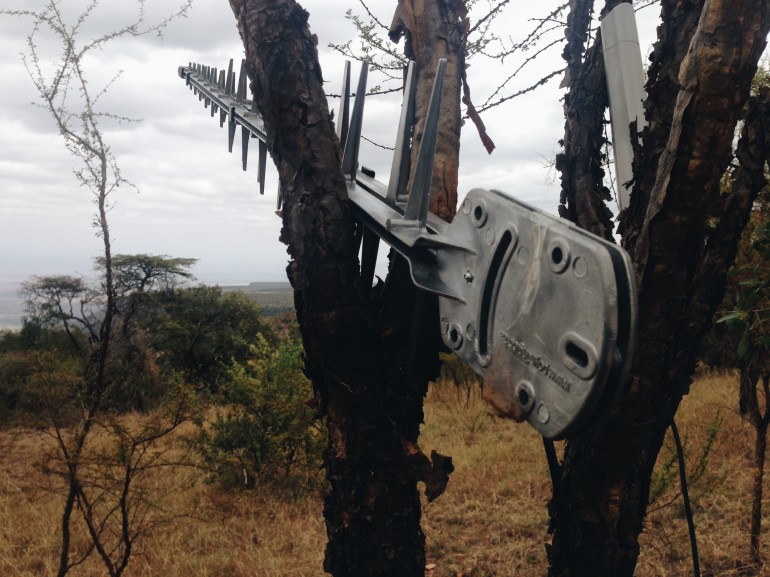
Using a Yagi from Poynting Antenna

Using a Yagi from Poynting Antenna

The main antenna we used was the large, 1 meter-long, cast aluminium Yagi antenna by Poynting. It’s big, tough and not easy to pack around with you, but it gets the best gain. We were easily able to reach out and grab the signals from the mobile phone towers about 4-5 kilometers away, and we got 90% or 54dBi.

It turns out that you can get three mobile phone connections from the Leakey’s. Safaricom has a decent signal, but the tower that serves the people in that community has no internet connection, to that was a dud. Orange also has a tower, and supposedly the internet data connection does work on it, but it wasn’t a strong signal and we didn’t have any luck with it. Airtel, on the other hand, had a good signal and had a data connection.

Philip and Reg getting the BRCK working at the Leakey's camp

Philip and Reg getting the BRCK working at the Leakey’s camp

Lessons Learned

While we had strong signal, we had two issues that we needed to solve, and only an hour to do it before we had to head back down the hill to make it back to Nairobi before dark.

First, we mainly use Orange and Safaricom internally, and didn’t have an Airtel SIM card with us. Fortunately Katy had one, so we were able to use it. This was an oversight on our part, and we’ll stock a couple of these Airtel SIMs in the future.

Second, the Airtel SIM had no credit on it. Since all of us carry phones that hold micro- or nano-SIMs, we had no way of topping it up either. An easy solution is that we’ll carry a simple phone with us that we can do this with in the future, but we also want to explore how we can enable this same top-up activity using the local (non-cloud) dashboard of the BRCK.

Third, that not all towers work, some give bad information. Just because you get a signal does not mean that you are connected to the internet, even if it says “Edge” or “3G” on your phone.

All-in-all, it was a good excursion, a chance to eat our own dogfood outside the comfort of Nairobi and the iHub. It was a reminder to be more prepared (in both the journey and the field test), and also a great opportunity to see some less well-traveled parts of Kenya.

The BRCKs view of the valley

The BRCKs view of the valley

BRCK at the Bottom of the Pyramid

BRCK’s founding team has a long history of making an impact – from Ushahidi to the iHub.  BRCK is of the same ethos as these other ventures, but a different business model.  BRCK is a for-profit company.  The founding team might not have realized it at the outset – but they’re not the only Kenyans who feel confident that the BRCK’s for-profit model will make them money.

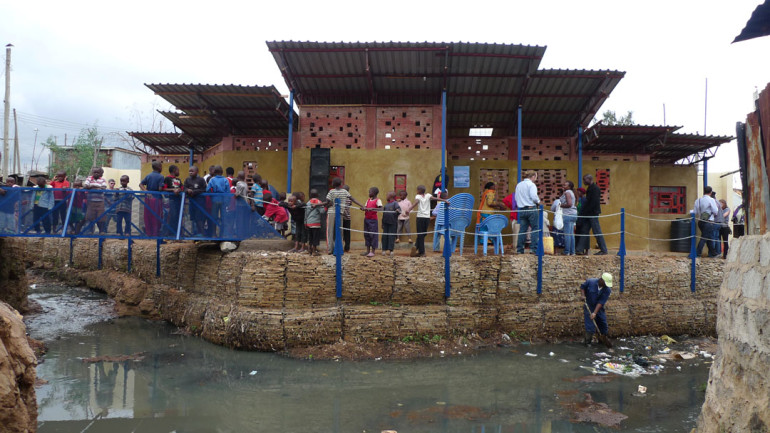
The Usalama Bridge Youth Reform group, based in Kibera, is banking on the BRCK to help them generate funds to open a cyber café through a collaboration with the Kounkuey Design Initiative (KDI).

KDI is a non-profit organization that works with underserved communities by collaborating with residents to design and transform public spaces.  At each site, KDI partners with community groups who propose concepts for the buildings.

KDI

At one of KDI’s recent project sites, the Usalama youth group proposed building a cyber café.  Their pitch was accepted, and the final project will feature space for a cyber café in addition to a sanitation block, a small playground and a daycare center.

The cyber café business model will be tested through a partnership with BRCK.  KDI and the Usalama youth group will receive a BRCK on loan for six months to see if they can make money by selling internet services in Kibera.

The project is also backed by the youth themselves.  The Usalama group started a savings and loan group in August of 2013, and has collected over 42,000 shillings, some of which will be used to launch the business.

Through research and hustle, the Usalama youth have gathered insights about the current cyber cafés in their neighborhood and their potential business strategy.  According to Usalama:

  • No one is using a modem or a fiber connection in Kibera.
  • Most cyber cafes spend 3,000 to 5,000 shillings a month for data, but Usalama is weighing the risk of buying a 10,000 shilling bundle to get the cost per-MB at a less expensive price.
  • Cyber cafes also typically forbid downloading movies and music. Usalama knows that these types of downloads, while requiring a lot of data, can help start other businesses by copying and reselling the movie and music files on DVDs.

While the dream of the Usalama members is brick and mortar cyber café, the start-up costs of acquiring computers and desks are quite high.  “We need to start somewhere,” says Pascal, one of the leaders of the Usalama. To test their idea, Usalama is going to experiment with buying data and selling internet access through the BRCK where groups already gather – like schools, restaurants and sporting matches.  They are also interested in planning their own events and providing internet access to attendees.   “We cannot wait for the customers to come,” Pascal says.

*KDI is assisting with interior design of the cyber café, helping get cost evaluations for the build and acquiring laptops and desks through fundraising and partnerships. If you would like to contribute, please get in touch with KDI directly at [email protected].

 Meghan Lazier is a summer UX fellow with BRCK.  She is currently a graduate student at School of Visual Arts in the MFA Design for Social Innovation program.


Shipping BRCKs!

“Shipping BRCKs”, if you say that title out loud, and quickly enough, you’ll know how we feel just about now… 🙂

brck-pic

First shipments: July 17th

That date above is the most important thing that everyone wants to know. Next week we’ll test the BRCK production line, and ship out the first batch of devices. Finally.

It’s been all quiet on the BRCK front since May as we buckled down on two things; first, making sure the quality of the cases was up to par, and second, using this time to keep improving the software. I can tell you that we’re finally there on both items!

We’re all extremely grateful for your patience, and we’re excited to finally get the BRCK into everyone’s hands.

Nairobi Launch

If you’re in Nairobi, we’re having a launch on Wednesday, July 9th at the Sarit Centre. Our partners, Sandstorm, have been kind enough to let us do a “takeover” of their store, and we’ll have BRCKs on display, showing how they can be used for business, personal use, and for connecting to the Internet of Things (IoT).

You’ll have a chance to use BRCKs, a few will walk away with free devices, and you can ask the team any questions you might have.

Come by and see us.

Making Ed-Tech Work in Isiolo

What does it take to launch an e-learning initiative in remote schools in Kenya?  Last week I packed my bags and drove four hours northwest of Nairobi to Isiolo to find out.  BRCK was invited on this exploratory trip as a potential technology partner by eLimu, an ed-tech company based in Nairobi that is bringing innovative curriculum to schools.

IMG_8920

The eLimu application runs on tablet devices is designed to help supplement classroom teaching in all six-subject areas tested by the Kenyan Certificate of Primary Education (KCPE).  With animated characters guiding students through the lessons, children are kept engaged by singing songs, taking quizzes and watching animated explanations about challenging concepts.  It also comes with additional curriculum on peace building, agriculture, civics and human rights.

IMG_8916

Each November, Kenyan students take a four-day exam in order to receive their KCPE and receive a high school placement.  When results are announced each year, Isiolo is consistently near the bottom of the rankings, and local politicians started to look at possible solutions.  During their research, they found eLimu.  During beta testing phase, eLimu has seen KCPE test results dramatically increase, and this is exactly why eLimu was invited to Isiolo on behalf of the Deputy Governor of Isiolo County.

I spent two days in Isiolo with eLimu and another technology provider, offering satellite and TV white space Internet solutions, to figure out how to implement a pilot test of eLimu in Isiolo.

So after two days, what did I discover?  BRCK has some major benefits as a technology provider for ed-tech initiatives:

Low start-up costs.  Pilot projects tend to be lean.  To launch a pilot test in three Isiolo schools reaching just over 1,200 students – without considering the cost of data – the start-up cost is just over $4,000 for the BRCKs, antennas and solar chargers.  While it’s extreme, compare that to the approximately $300 million it costs to build, launch and maintain a satellite Internet connection.

Data solutions.  BRCK has secured inexpensive data plans and bundles that are easy to purchase.  Since the tablet content will likely be viewed multiple times, the BRCK can cache the pages through its internal storage features, which requiring less data.

Coordinated monitoring and evaluation.  By registering all of the pilot BRCK devices to the project, a government official could easily log-in to the online BRCK dashboard to see which BRCKs are connected, how long they have been online and if more data needs to be purchased.  Both eLimu and the local government can see real-time information and intervene if needed.

Simplicity.  eLimu cannot introduce technology solutions into schools that are complicated.  Simplicity and ease-of-use are key. Period.

While there are multiple technology solutions to choose from, BRCK has the potential to bring connectivity to projects that can strengthen the future of Kenya’s education system.

 Meghan Lazier is a summer UX fellow with BRCK.  She is currently a graduate student at School of Visual Arts in the MFA Design for Social Innovation program.

Internet at the Rhino Charge with BRCK

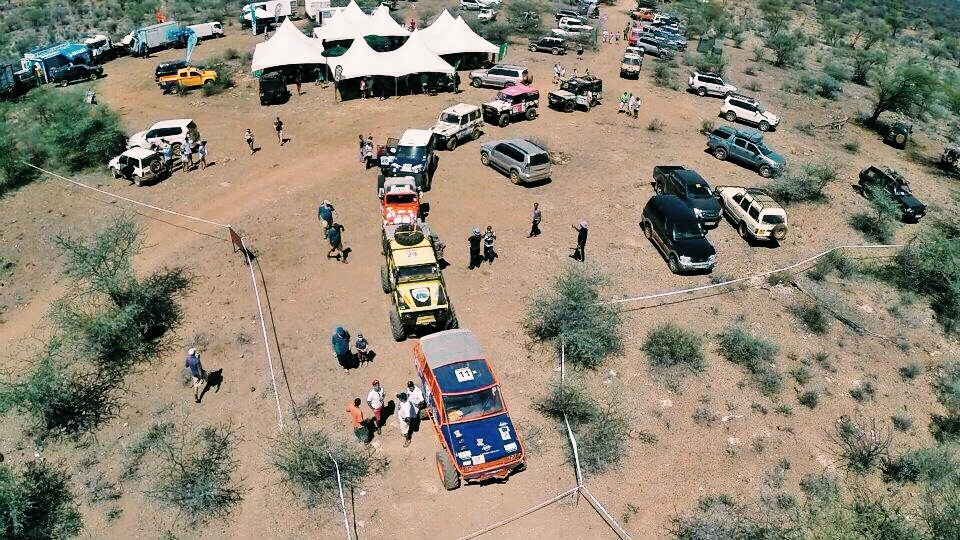
The BRCK team sets up at the Rhino Charge 2014

The BRCK team sets up at the Rhino Charge 2014

We tend to be an adventurous bunch, and so it shouldn’t be surprising that Philip was the navigator for the BRCK vehicle in Kenya’s annual bushwhacking event called the Rhino Charge.

The Rhino Charge is unique, it works this way…

No one knows where the race will be until a week in advance, when a “jump off” town is named. People drive there the day before and are given a map to the camp. The night before the race, everyone is given 14 coordinates, with one as their starting point (each of the 65 cars are put at different ones, so about 5-6 at each node). The next morning at 5:30am they’re driven to their starting spot, and at 7:30am the whistle blows and they’re off. Each team’s job is to find the shortest route to all 14 spots and checkin within 10 hours. Whoever has the shortest distance between and finishes all 14 checkpoints, wins.

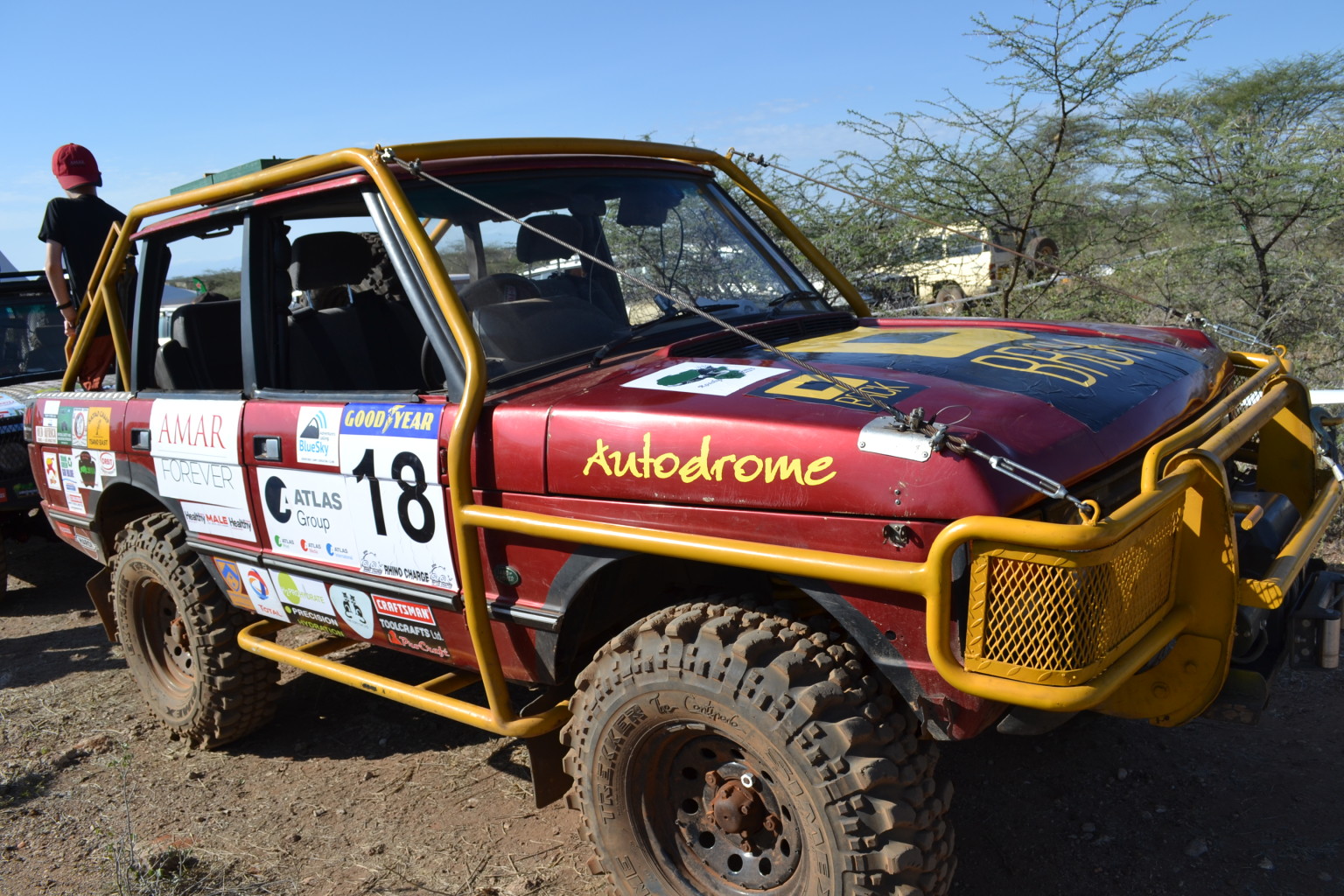
The BRCK Mobile - car 18

The BRCK Mobile – car 18

Rhino Charge vehicles checking in for scrutineering before the race

Rhino Charge vehicles checking in for scrutineering before the race

A couple of weeks ago the head of Rhino Charge got in touch with us to see if we’d mind setting up a few BRCK units for the competitors camp to allow people to get on WiFi there. We agreed, and soon enough Emmanuel, Jeff and myself were also going 6 hours north of Nairobi to Samburu country with Philip to setup some BRCKs.

Setting up the BRCK

It turned out that the Rhino Charge competitors camp and headquarters were about 10Km away from the nearest mobile phone tower. This meant that you could get a 3g signal, but barely, and it would fade in/out all the time. We were solving this problem at the competitors camp with the use of a directional antenna and mobile signal amp (booster).

We then got an urgent call from the head of Rhino Charge, HQ had just lost their internet and were wondering if we could switch our operations to their tent instead. Off we trundled with our gear and did the following:

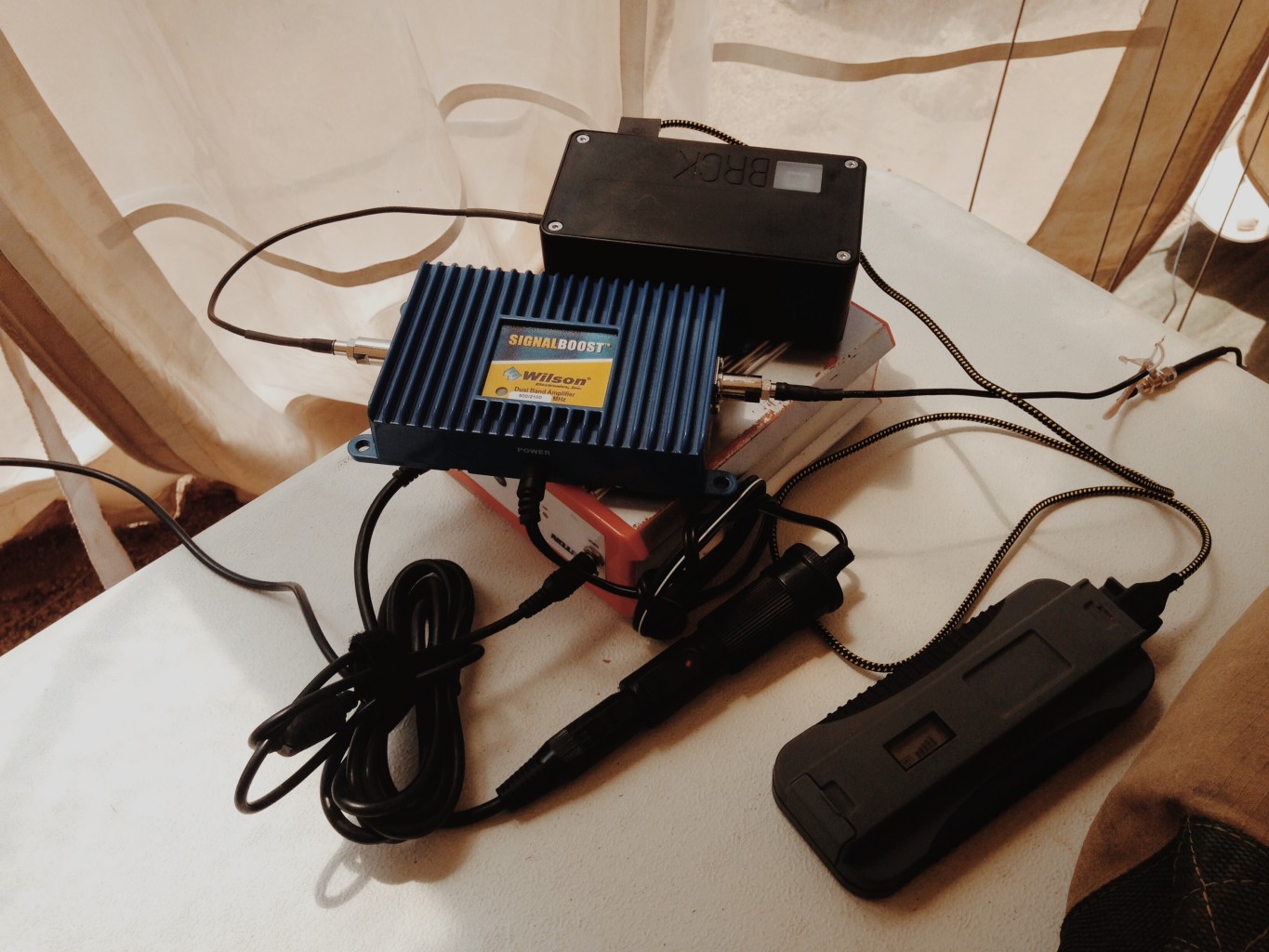
The BRCK setup at the Rhino Charge HQ

The BRCK setup at the Rhino Charge HQ

  • Directional antenna (by Wilson) pointed at the tower 10km away
  • Wireless amp booster (by Wilson) to increase the signal strength
  • 12v battery (by Brunton) to power the amp
  • BRCK to transmit for WiFi
  • BRCK with an ethernet cord to plug into a TP-Link 3420 to broadcast WiFi to their IT staff
  • Safaricom SIM card with 32Gb of data
  • Solar battery (by PowerMonkey Extreme) to charge the BRCK
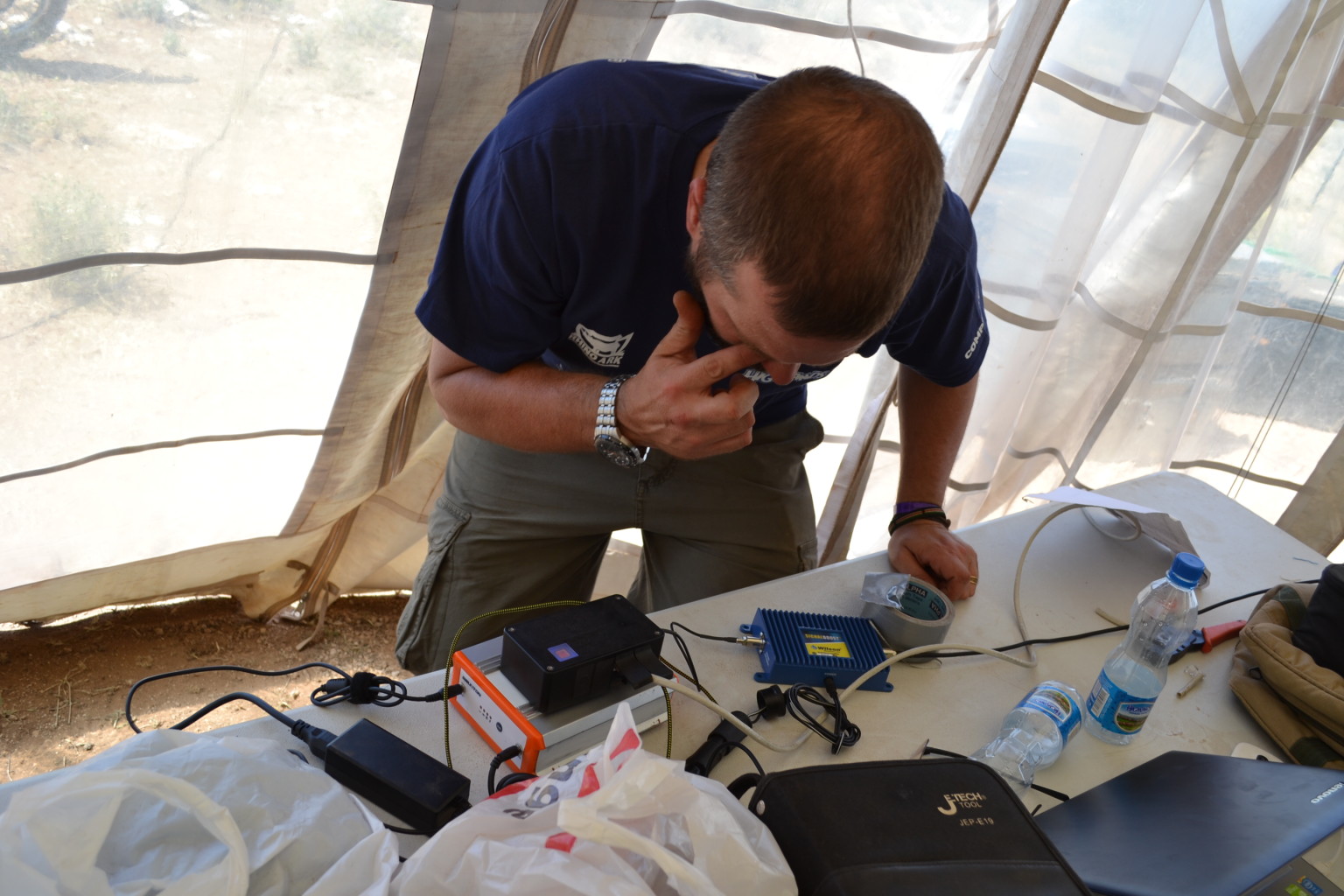
Philip sets up the BRCK in the Rhino Charge HQ

Philip sets up the BRCK in the Rhino Charge HQ

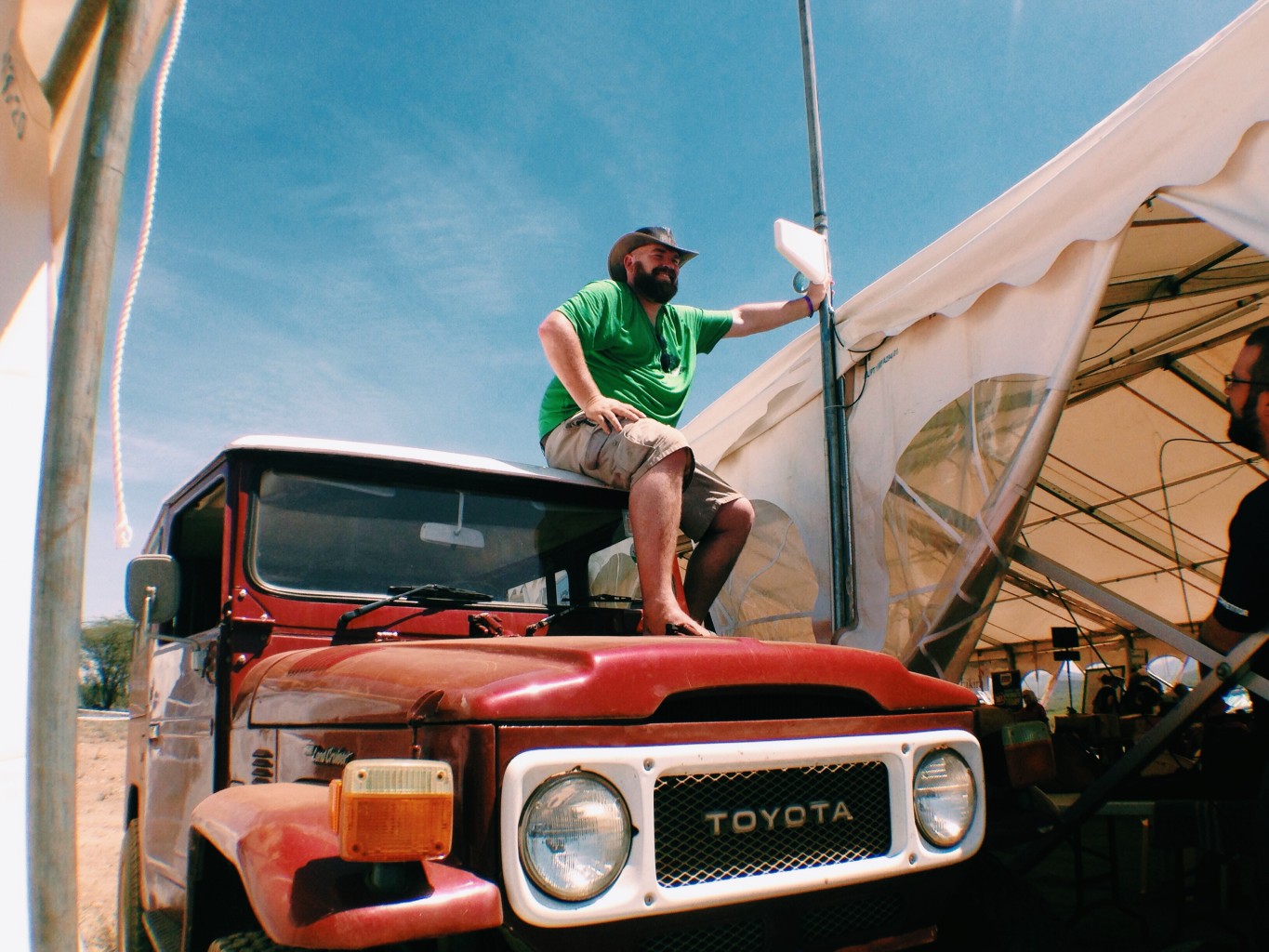
Me setting up the directional antenna, using my car as a ladder

Me setting up the directional antenna, using my car as a ladder

Takeaways

Whenever you do field testing, there’s always a sense of relief when things work as they should. In this case, it was extremely gratifying to be able to help the Rhino Charge HQ staff on their connectivity needs, and it validated a lot of what we say about connectivity when you’re in a place with poor infrastructure. The fact that we were able to get the BRCK up and going, provide the backhaul for all of the media and stuff happening around HQ was fantastic. The only time we lost signal was for a 5-hour spot when the main Safaricom tower we were connected to got hammered by too many spectators showing up and trying to check their Facebook feed… 🙂

This does go to show that when your last line of connectivity is the mobile provider, you’re really at their mercy for what is available on their mobile tower.

Moving the power button from the top to the side was a decision we made after our Turkana expedition. This was a good move, with the dust flaps on the side, we cracked open the BRCK when we got back and there was no dust inside the case at all.

When we were struggling to get connection, we needed to know that the BRCK needed to show us that it was struggling and what the issue was. Our redesign of the lights gave us this, and it was extremely helpful this time up north.

However, there’s also some lesson’s learned and things we want to improve on the BRCK, which is good news for everyone buying a device. When the BRCK team “eats our own dogfood“, you benefit. Here’s what we found that we didn’t like, and which we’re fixing (or have already fixed):

  • We need to come up with a model that defines what “abnormal BRCK behavior” is. This would be extremely useful for sending out SMS alerts especially where the device is deployed in a remote location. To put this into perspective, Jeff and Emmanuel had to periodically drive to the HQ to check on the BRCK! (like a bunch of field officers in an NGO) [Working on, will be done before shipping]
  • BRCK not turning off: On the day of the setup in the field, we attempted a reboot but the BRCK wouldn’t turn off. To circumvent this, we had to pop the top open and perform a short on the BRCK board. [Fixed]
  • Spotty Connectivity: Before connecting the Wilson antenna, mobile network connectivity at Rhino Charge HQ – via the BRCK -was extremely spotty; signal strength was below 22dBm. We have no way of communicating this to the user. In our opinion, the lights aren’t sufficient to communicate this simply because it’s too much information for the user to memorize. Recommendation: Communicate this info via the on-board dashboard. [Working on, will be done before shipping]
  • Detection of connected network interfaces: Both the 3G and Ethernet network interfaces were connected and active but this information was not been reflected on the cloud dashboard and preferences page. [Fixed]
  • Local SIM metadata: The phone number of the SIM and it’s respective mobile network wasn’t available on the cloud (and is not yet being pushed to the cloud). Having this information would have made balance top up of the local SIM less of a pain. [Working on, will be done before shipping]

Problems, Perseverance, and Patience

Building BRCK – Assembly from BRCK on Vimeo.

[Some shots from the factory, building BRCK, this week.]

I know that we weren’t naïve in the early days of BRCK thinking that it would be easy to build an amazing hardware device in Kenya. We couldn’t have been. We aren’t rookies. This isn’t our first rodeo – as the expression goes – and yet we still find ourselves months behind on getting our product shipped. Did we miss something obvious in our planning? Were we unrealistic about our capabilities and capacities? Did we simply have some incredible misfortune?

Honestly, the answer to all of these – at least on some level – is yes.

Sure, Reg and I have experience in bringing hardware products to market. We know the pitfalls of having injection-molded plastics made in China not looking correct. We’ve made small mistakes on board layouts that required last minute hand fixes and reworks. We’ve had suppliers completely drop the ball in meeting their delivery commitments. These things are absolutely normal and expected in designing hardware products – particularly if your entire company sits in the same room as the soldering irons and oscilloscopes.

On the software side, Emmanuel, Wesley, Erik, and I have all brought software systems and products to market. We have sat in the meetings were we suddenly realized that a critical feature/function had been completely overlooked. Participated in the user testing sessions where the look of bewilderment on the face of the tester causes your heart to sink into your stomach. Pushed ourselves through “highly productive” 3 am coding sessions that take hours the next morning to unravel in the clearer light of day. This is the reality of startup software engineering in the age of Android and Flappy Birds – actually I think it has always been this way.

We know these realities. They aren’t foreign or unexpected to us. And yet with every delay or misfortunate turn of events we still all stare at each other in shock and disbelief. We expect things to be different at BRCK. We see ourselves as a rugged and tenacious group of creatures that have our skin thickened by the hot African sun and our eyes steeled to navigating the rocky road ahead. It’s who we are. When we adventured out on BRCK Expedition Turkana we should have seen that this was a harbinger of things to come: trucks breaking down, satellite receivers mysteriously running out of credit, routes getting flooded, and the unlimited supply of things-not-going-as-planned. Sure we got frustrated. At each other. At the circumstances. It’s a natural human reaction. But we never gave up. We didn’t even entertain it in conversation. We all dug deep into the beautiful resource called human spirit and plowed ahead until we reached our goal. Sure we’ll do some things differently on the next expedition, we are fools to not learn from our experiences, but we know that the only thing that really matters in setting off is our collective resolve to persevere and push on towards the mark.

Which brings me back to BRCK. Earlier this week we finally received our delayed set of production plastics from China. They were awful. They looked nothing like the first articles that had previously been sent through or the amazing cast cases that were molded from 3D prints. As we sat and stared at the disfigured hunks of plastic that were meant to hold the product of months of hard work our hearts – once again – sank and we stared at each other in disbelief. Although we briefly entertained proceeding with production using the “ugly” cases, we know that we are flag bearers for engineering and designing products the right way in Africa. While we live in a culture where the standard of craftsmanship is often “good enough” we must be an example for something much higher.

So we are sadly forced to delay our production one more time and ask for patience. Patience from our customers who are eager to get their hands on a BRCK. Patience from our team as we continue the sprint to get BRCK to market. Patience from our backers who have shown so much faith in our vision and the potential for BRCK to be a game changer in the market. It’s a big ask on our part and we don’t make it lightly. We won’t sit back during this time and simply wait. There are many things that we know we can do better on the software and usability side of BRCK. We will continue pushing ahead on making the user experience more intuitive and useful. We will take our handful of ugly BRCKs and put them to the test in as many challenging situations as we can find. We will do everything within our abilities to use this misfortune as an opportunity for making BRCKs better. As painful as it is for us to be in this situation today, I know that at the end of this journey we will look back and be grateful for the additional opportunity to ensure that BRCK really lives up to its full potential as a world-class hardware device from Kenya.

We’re working with our case manufacturer to get a new timeline for delivery, which we’re expecting to be no more than a few weeks.

“40% of the world is on the internet” and other 2014 stats

The ITU has just put out a new report showcasing some astounding numbers on general internet penetration, mobile broadband (wireless) use, and how the developing world compares to the rest.

[2014 ICT Facts and Figures ITU (1.7Mb PDF download)]

A couple of the interesting statements and figures

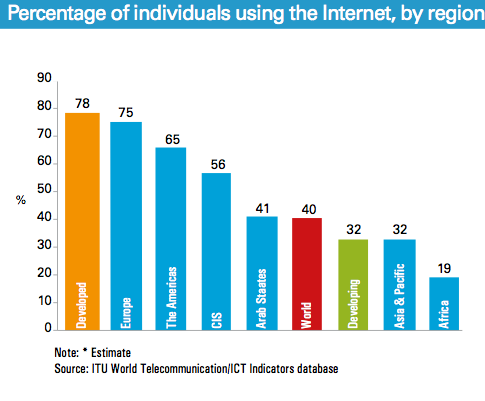
  • Internet user penetration has reached 40% globally, 78% in developed countries and 32% in developing countries. 2014 growth rates in developed countries remain at a relatively low, at 3.3% compared with 8.7% in developing countries.
  • In developed countries, mobile-broadband penetration will reach 84%, a level four times as high as in developing countries (21%).
  • Mobile-broadband penetration in Africa reaches close to 20% in 2014, up from 2% in 2010
Global active mobile broadband subscriber growth

Global active mobile broadband subscriber growth

  • Almost 7 billion mobile-cellular subscriptions worldwide – The developing countries are home to more than three quarters of all mobile-cellular subscriptions.
  • Fixed-broadband growth is slowing down in developing countries.
  • Almost 3 billion people (40%) are using the internet.
Percentage of individuals using the internet, by region, 2014

Percentage of individuals using the internet, by region, 2014

  • In Africa, almost 20% of the population will be online by end 2014, up from 10% in 2010.
  • 2013/14 growth rates in the developing world will be more than three times as high as those in the developed world (12.5% growth compared with 4%)